
App for Baseball Walk-Up Music: Filter and Find the Right Track Fast
Baseball walk up songs: How to use the Pros Playlist filter in the app to quickly find the right walk-up song and add it to your players.
Patrick Taylor
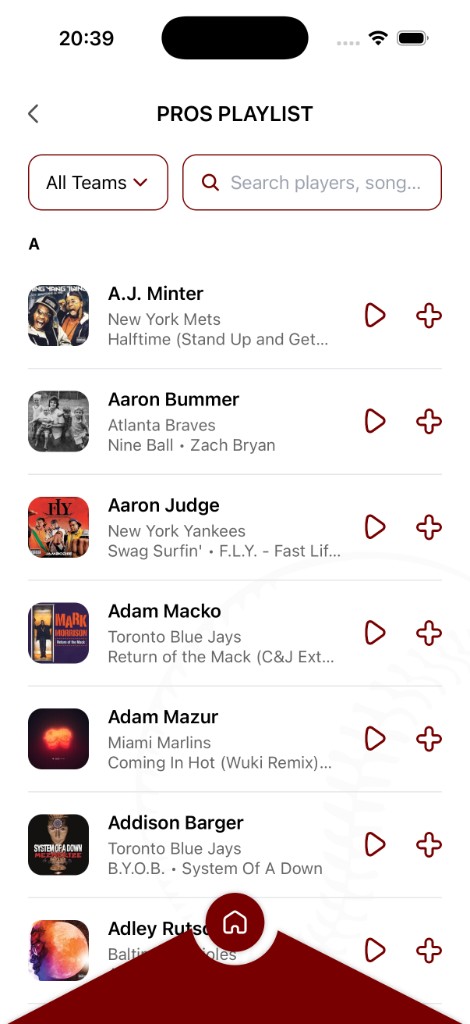
Instead of scrolling through endless music, use the app's Pros Playlist as your starting point. Filtering by team helps you lock in a clear vibe faster—then you can preview and assign songs to your lineup.
How filtering helps you pick faster
- Choose a team vibe (instead of guessing the perfect song first)
- Scan quickly for songs that match your player’s energy
- Preview to confirm the intro works with your speakers
- Add with one tap when the track feels right
Your quick “find and add” workflow
How to add these to your team in the app
Open Pros Playlist.
Filter by team to narrow down the songs you see.
Search for the player or song you want.
Preview the track, then tap + to assign it.
Repeat for the players you are setting for game day.
If you can pick a team and find the vibe in a few minutes, your whole lineup gets easier to build.
Ready to bring your walk-up songs to life?
Download the Baseball Walk-Up Songs app and take your team's game-day experience to the next level.
Get the app